You paid for the unlimited plan on Monday, and by Wednesday afternoon a banner tells you to try again in a few hours. AI usage limits are behind almost every plan, including the ones sold as unlimited. The plans worth paying for tell you where the limit is before you reach it, and the rest leave you to find out mid-task.
Expect a limit behind the word.
Every answer costs the provider money to compute, and a 40-page PDF on a large model costs far more than a one-line question. So "unlimited" is often qualified somewhere other than the pricing grid.
MaxAI's pricing page lists "Unlimited Pro chat" on its Pro plan. The Fair Usage Policy in its terms says "Premium accounts are allocated a specified number of smart AI or image queries per month" and that MaxAI "may implement rate limiting on queries that exceed typical human usage patterns". Both pages read that way as of October 29, 2026.
Other plans skip the word and name the window instead. Claude's pricing page says "Every plan has usage limits that reset on a rolling five-hour session window, and paid plans add weekly limits on top." Google's Gemini help says "Your limit refreshes every 5 hours until you reach your weekly limit." That's easier to plan around, though a limit stated as a multiple of another plan's still leaves you without a number.
Before you pay, open the plan's pricing page and its terms, and ask the sidebar to pull the limits out for you:
List every usage limit this page mentions: what it counts, how much, when it resets, and what happens when I reach it. Quote the sentence for each one, and write "not stated" where the page doesn't say.
Then find each quoted sentence on the page yourself. A "not stated" for what happens at the limit is an answer in itself.
Find out what the limit counts.
The unit decides which of your habits use it up. Plans count one of four things:
- Messages are easy to read, but a one-line question and a long contract review count the same, so plans often cap the larger models separately.
- Credits or points are the vendor's own exchange rate. Check how many a long request or a larger model costs, because that rate is where a plan quietly shrinks.
- Tokens are pieces of text going in and out. Long pages, attachments and long conversations use more, and output often costs more than input.
- Cost is what each request costs to run. It tracks what you actually used, and it means there's no fixed number of questions.
If you read long documents all day, a message cap may suit you better than a token budget. If you mostly ask short questions, the reverse is true.
Find out when it resets.
Look for two things: how long each window is, and when it starts.
Rolling windows of a few hours stop a burst of heavy use, and many plans add a weekly or monthly cap on top. The two stack. You can have room left in today's window and still be blocked by the week. A monthly allowance you spend in the first week means three weeks of waiting.
Check whether a window starts at a fixed time or with your first message. A window that starts with your first message never leaves you halfway through a block of time you didn't use.
Find out what happens at the limit.
A plan can do one of four things when you run out: stop until the reset, switch you to a weaker model, slow you down, or sell you more. Stopping is annoying but honest. The switch is the one to watch for, because your answers get worse without anyone saying so.
Look for a plan that tells you, in the interface, which of these just happened and when it ends. If the terms describe it only as "temporary service limitations", expect to find out the hard way.
Check where the meter lives before you pay.
A limit you can see is one you can plan around. Look for a usage meter inside the product, with a percentage and a reset time, not a number you can only find by hitting it.
In Lensia, the bolt in the sidebar's bottom-left corner shows how much of the current session you've used. Hover it for both limits, Session and Weekly, and the time until each resets. A session that hasn't started reads "Starts with your next message".
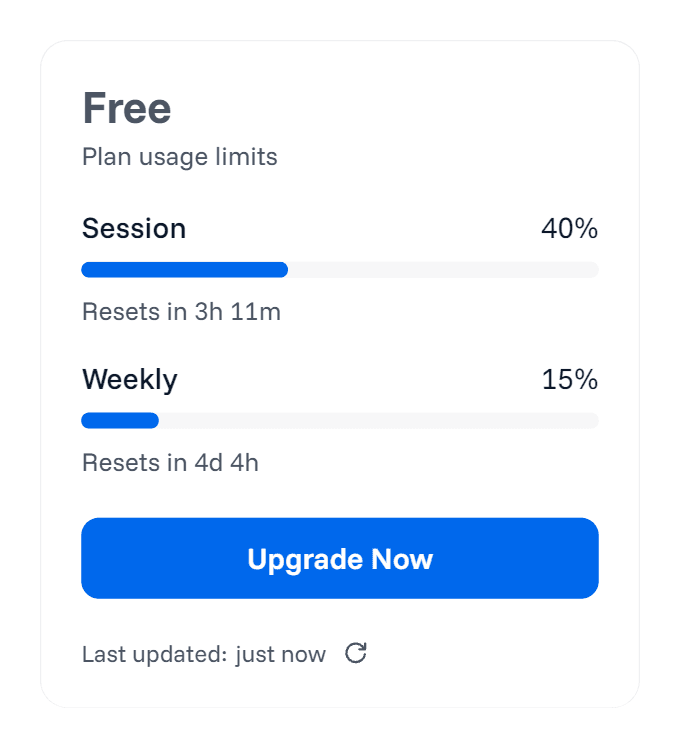
Check it after a normal hour of work, and you'll have a rough idea of how many hours like that one session holds.
Read the renewal terms as closely as the limit.
The other common surprise is a renewal charge you forgot was coming. Before you subscribe, find three things in the terms:
- How often it renews, weekly, monthly or a year up front, and whether an introductory price renews at the regular one.
- How you cancel, and whether access lasts to the end of the period you paid for.
- Whether refunds exist at all, and how many days you have to ask.
Lensia's paid plans renew weekly or monthly, matching what you chose, until you cancel, and Pro's first-time discount renews at the regular price. You cancel from the Billing tab of your account page, keep the plan until the end of the period you've paid for, and then move to Free. Refunds aren't owed unless the law requires one, but you can ask within 7 days of a charge.
Make your allowance last.
On any plan that counts cost or tokens, the same habits stretch it:
- Send the part you need. A pasted section costs less than a whole report, and the PDF summarizer guide shows how to save just the pages you need.
- Match the model to the job. A two-line rewrite doesn't need a frontier model; the multi-model guide covers when to switch and when higher effort earns its cost.
- Start a new conversation when a thread has drifted. Each message carries the conversation before it, so a long thread makes every question cost more.
- Stop an answer that's heading the wrong way. In Lensia you pay only for what was written before you stopped it.
Sending less is good for privacy too. The guide to AI extension safety shows what goes out with each message.
Know how Lensia counts.
Lensia measures cost, not messages, so a long page or a larger model uses more of your allowance than a short question does, and there's no fixed number of questions per plan. It has two allowances. The 6-hour session starts with your first message, and when it ends, your next message starts a new one. The weekly allowance runs on a fixed 7-day cycle from your first request.
Both reset times are in the sidebar, and the banner that appears at the limit says when you can continue. On Free with Lensia Max selected, Lensia may keep answering on a basic open-source model after the limit, and the banner says "Responses now use a basic model until" the reset time.
Free gives you limited usage, Basic gives you more, and Pro gives you even more. Pro isn't unlimited. Compare the plans after a week of real use, when you know which limit you actually reach. The buyer's guide to AI Chrome extensions has a test that shows which features your work needs.
Add Lensia to Chrome, do a normal hour of work, and hover the bolt to see what it used.